Skip to content
Isaac Smith Labs
PackTrack app icon: a solid red wolf

Workout tracker and AI coach

PackTrack

Train smarter.

A workout tracker that plans your next session from the sets you logged.

In active development
  • iPhone · in testing
  • Android · planned

Not on the App Store or Google Play yet. PackTrack is in private testing on iPhone.

PackTrack in-workout screen for BB Bench Press, set 1 of 4, with exercise pills 1 to 5 and a Finish button at the top and "Aim for 1–2 reps left". A large white panel shows the bench press demonstration image (a man pressing a barbell, chest highlighted red), with a small round button to switch to the muscle figure. Below it, 220 (weight, lb) × 6 (reps) in red, the plate line "45 + 35 + 5 + 2.5 / side", Info, Swap and Log set buttons, and "Next Incline DB Press, 82.5 lb × 8–12; Rest 2–3 min".
PackTrack Today screen on Monday, Nov 9: "Good afternoon.", "Day 1 of 5 · Push", a one-line proverb, and a week strip from the 9th to the 15th with Monday selected. Below it, today's Push card with a large exercise image of a man doing a barbell bench press on a white studio background (chest highlighted red, a small PackTrack mark), the title Push with small front and back muscle figures (chest and shoulders red), a red Start workout button and the tab bar (Today, Workouts, Coach, Progress, More).

Know what to lift today, and why.

PackTrack plans your training and adjusts every target from the sets you log. Right on target, and the weight goes up next session. A little short, and it holds. Either way it tells you in one plain sentence.

Each screen answers one question. Today shows what to do next. The workout shows one set at a time. Nothing competes for your attention between sets.

And it never invents a number. Every target, record and trend comes from training you actually logged. When there isn't enough data yet, it says so.

Today, at a glance.

Open the app and the answer is already there: today's session, your week, and one button to start.
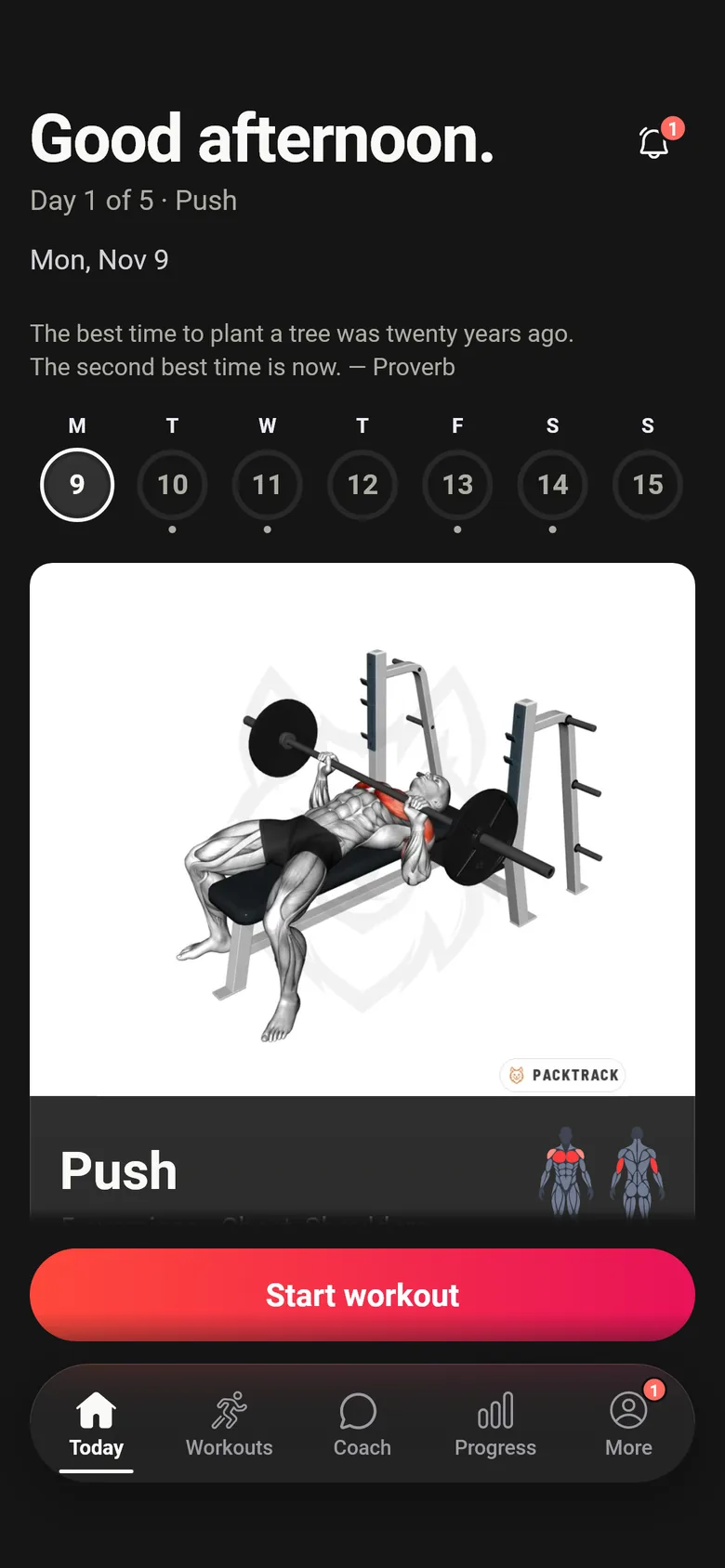

PackTrack Today screen on Monday, Nov 9: "Good afternoon.", "Day 1 of 5 · Push", a one-line proverb, and a week strip from the 9th to the 15th with Monday selected. Below it, today's Push card with a large exercise image of a man doing a barbell bench press on a white studio background (chest highlighted red, a small PackTrack mark), the title Push with small front and back muscle figures (chest and shoulders red), a red Start workout button and the tab bar (Today, Workouts, Coach, Progress, More).

See it, then lift it.

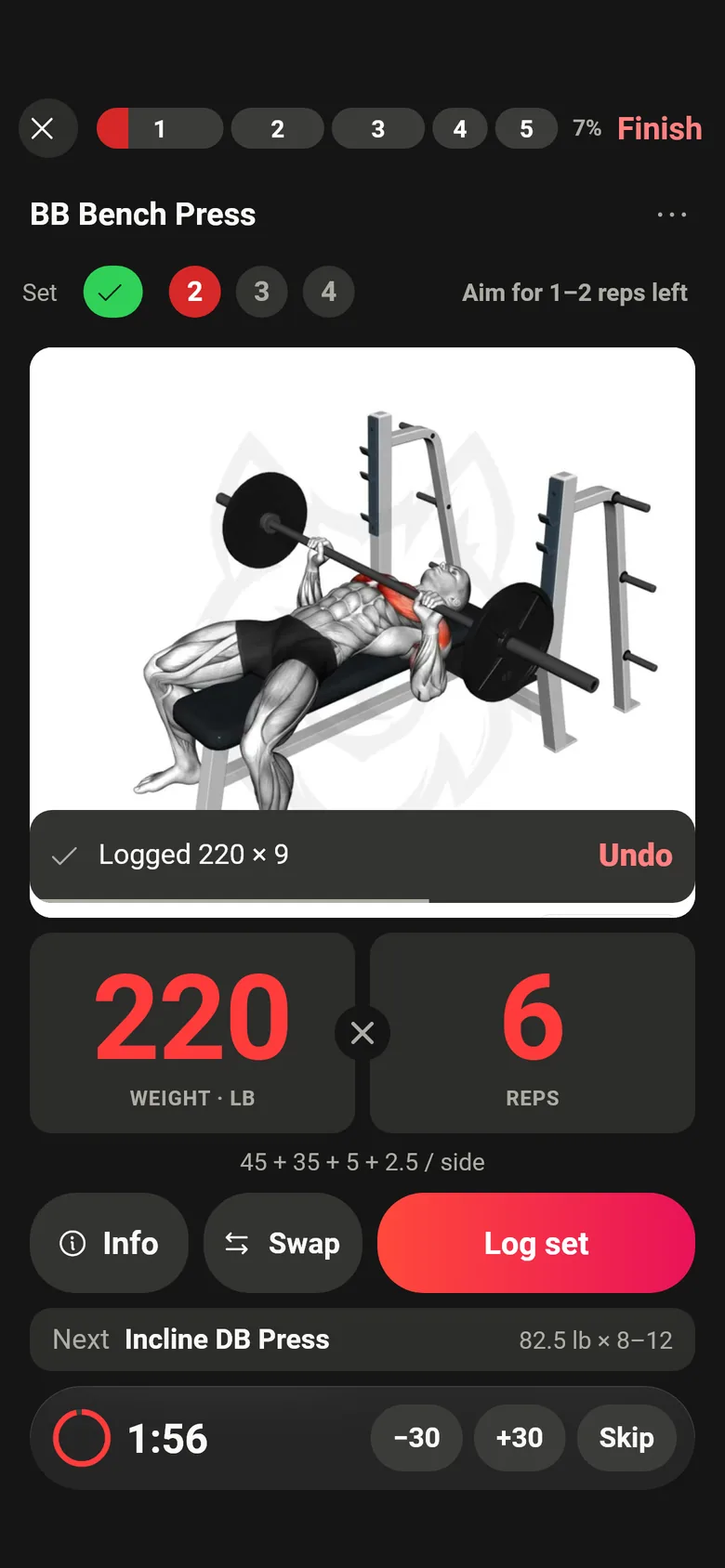
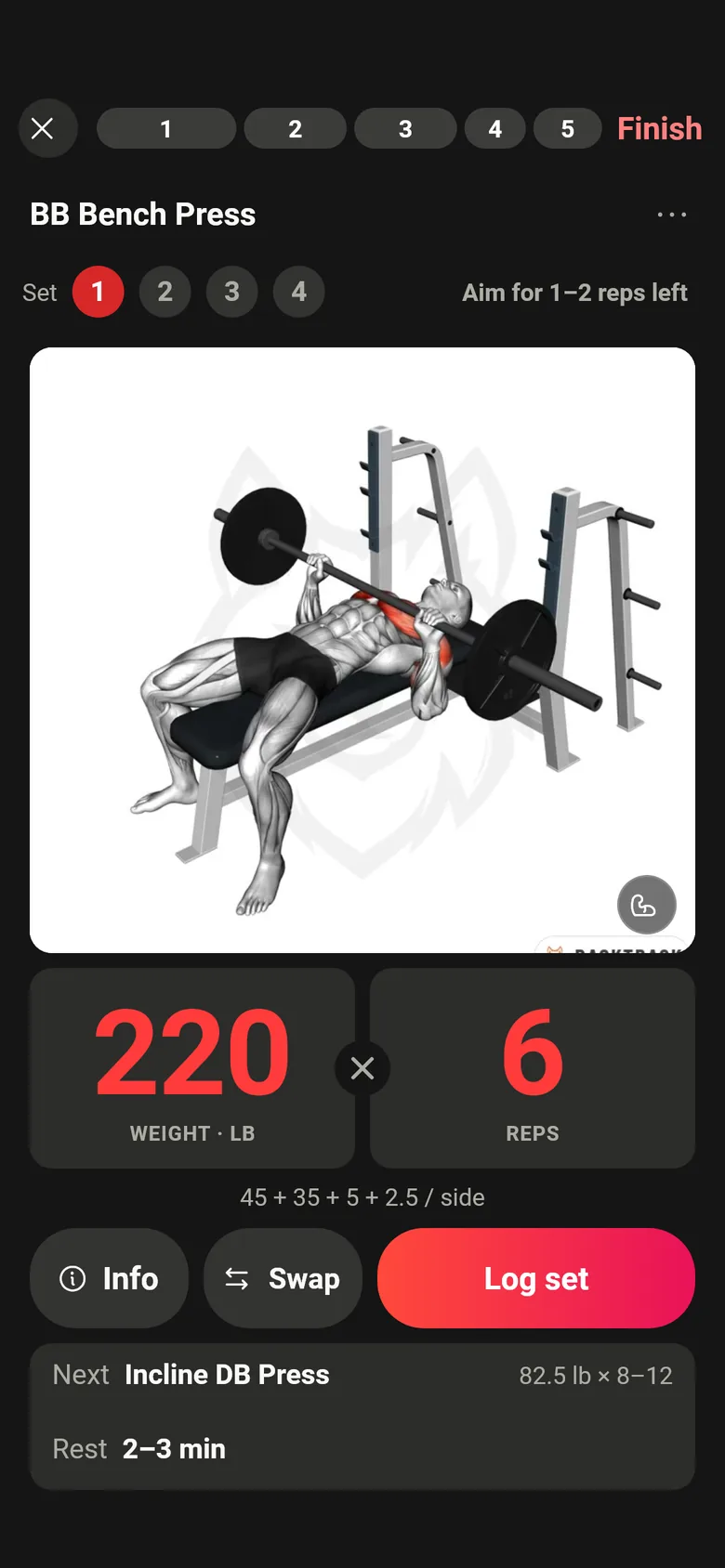
The exercise you're on plays a clear demonstration, so you know the movement before you load the bar. Prefer to see the muscles it works? Switch to the muscle map with one tap, and PackTrack remembers that for the exercise. Your own custom exercises show their muscle map.

PackTrack in-workout screen for BB Bench Press, set 1 of 4, with exercise pills 1 to 5 and a Finish button at the top and "Aim for 1–2 reps left". A large white panel shows the bench press demonstration image (a man pressing a barbell, chest highlighted red), with a small round button to switch to the muscle figure. Below it, 220 (weight, lb) × 6 (reps) in red, the plate line "45 + 35 + 5 + 2.5 / side", Info, Swap and Log set buttons, and "Next Incline DB Press, 82.5 lb × 8–12; Rest 2–3 min".

One set at a time, then rest.

The weight is the biggest thing on screen, with the reps, how many to leave in reserve and the plates for each side. Log the set and the rest timer starts, with the next set already spelled out.

PackTrack in-workout screen resting after set 1 of BB Bench Press: set 1 is ticked green and set 2 is next, the workout is 7% done. The bench press demonstration image fills the panel, with a strip over it reading "Logged 220 × 9" and an Undo button. The next set is 220 lb × 6 with the plate line "45 + 35 + 5 + 2.5 / side", then Next Incline DB Press 82.5 lb × 8–12, and a rest timer at 1:55 with −30, +30 and Skip buttons.

What you trained, and what's next.

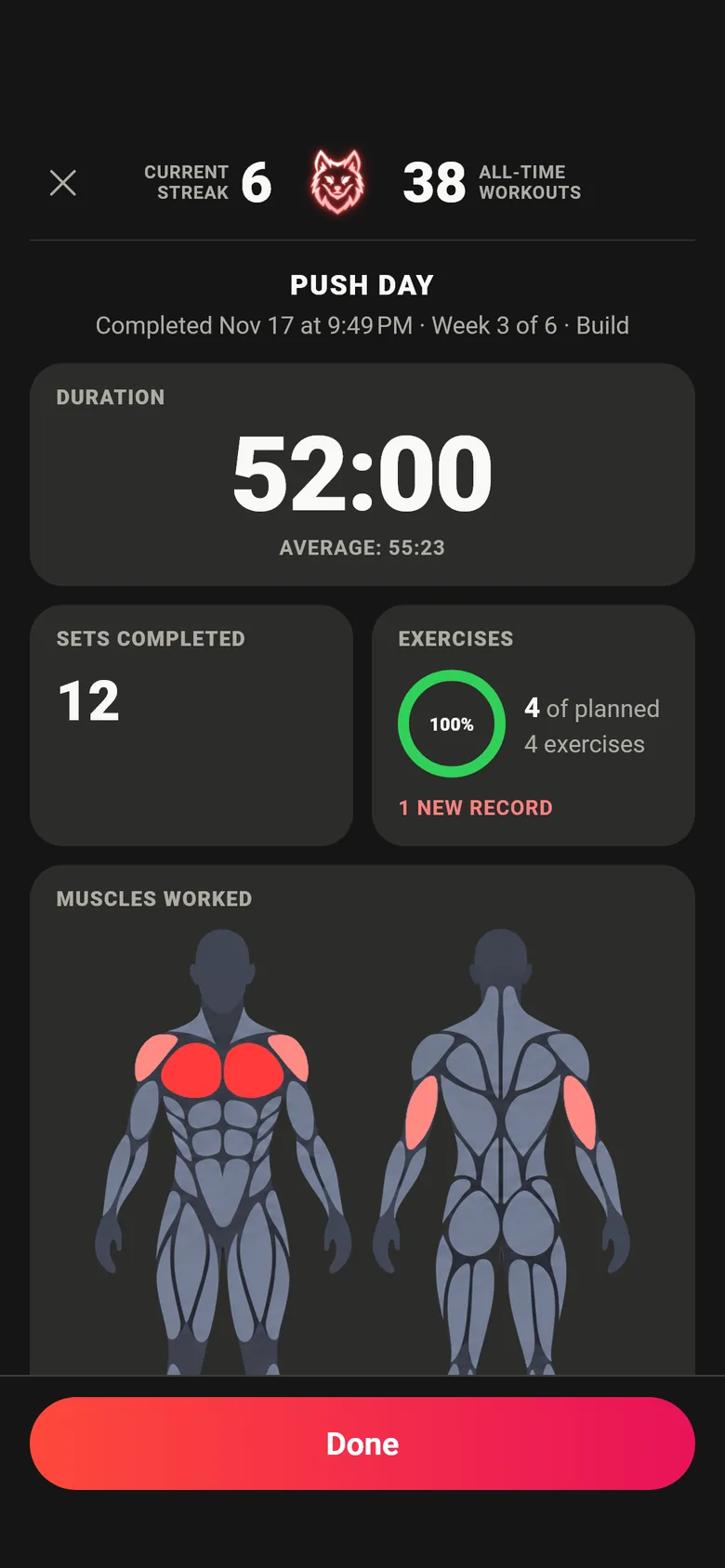
Every workout ends with the muscles you worked, your records, and a plain plan for next session: which weights go up, and which stay.

  • Weight and rep records, straight from what you logged
  • Next session's targets, explained in one line
PackTrack Workout Complete screen: current streak 6 and 38 all-time workouts beside the wolf logo, "PUSH DAY", "Completed Nov 17 at 7:28 PM · Week 3 of 6 · Build", a Duration tile at 52:00 (average 55:23), Sets completed 12, Exercises 100% (4 of planned 4 exercises) with "1 new record", and a Muscles worked card with front and back body figures (chest bright red, shoulders and triceps lighter red), above a red Done button.

Progress you can see.

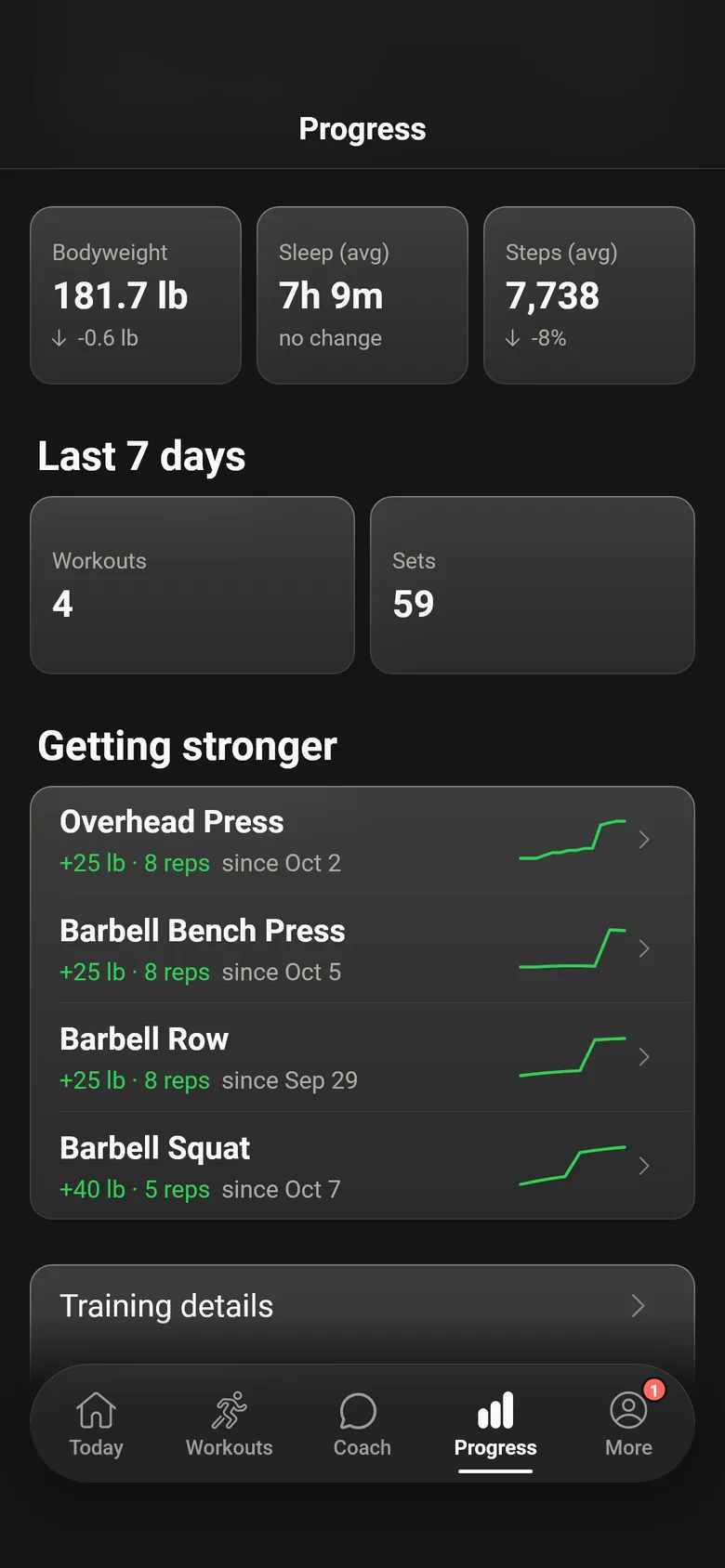
Which lifts are getting stronger and by how much, next to your bodyweight trend, sleep and steps. Connect Apple Health if you like: PackTrack reads only the categories you choose.

PackTrack Progress screen, scrolled a little: tiles for Bodyweight 181.7 lb (−0.6 lb), Sleep average 7h 9m (no change) and Steps average 7,738 (−8%); Last 7 days with 4 workouts and 59 sets; and Getting stronger, with green trend lines: Overhead Press +25 lb · 8 reps since Oct 2, Barbell Bench Press +25 lb · 8 reps since Oct 5, Barbell Row +25 lb · 8 reps since Sep 29, Barbell Squat +40 lb · 5 reps since Oct 7. A Training details row and the tab bar are at the bottom.

Food, without the fuss.

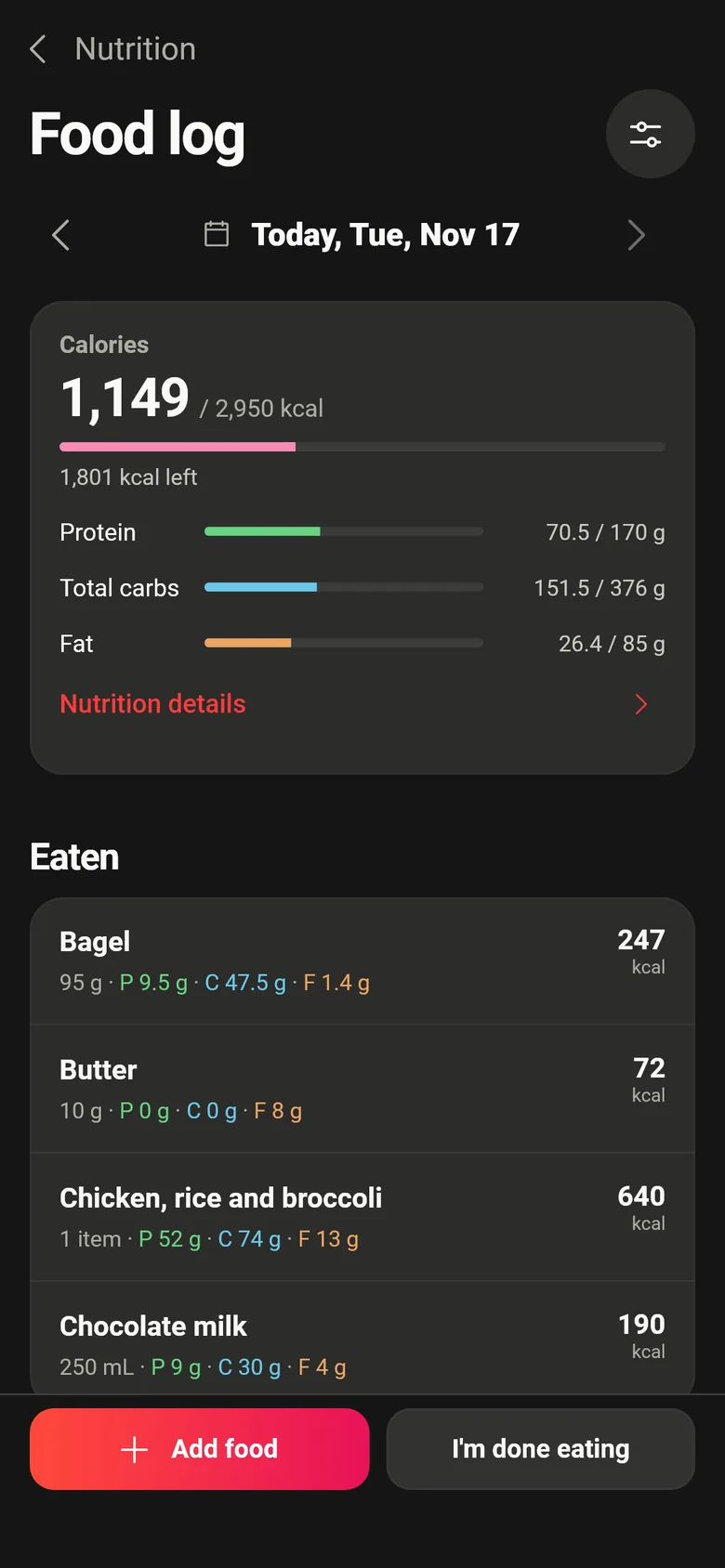
Log a meal by hand or scan a barcode, and see calories, protein, carbs and fat against your targets for the day.

PackTrack Food log for Today, Tue, Nov 17: Calories 1,149 of 2,950 kcal (1,801 kcal left), Protein 70.5 / 170 g, Total carbs 151.5 / 376 g, Fat 26.4 / 85 g, and a Nutrition details link. Eaten: Bagel 95 g (247 kcal), Butter 10 g (72 kcal), Chicken, rice and broccoli, 1 item (640 kcal), Chocolate milk 250 mL (190 kcal), each with protein, carbs and fat. Add food and I'm done eating buttons at the bottom.

An AI coach that knows your training.

Ask why a lift stalled or what to do next week, and the AI Coach answers from your own logged workouts, with the numbers to show for it. Coming with PackTrack Premium at launch.

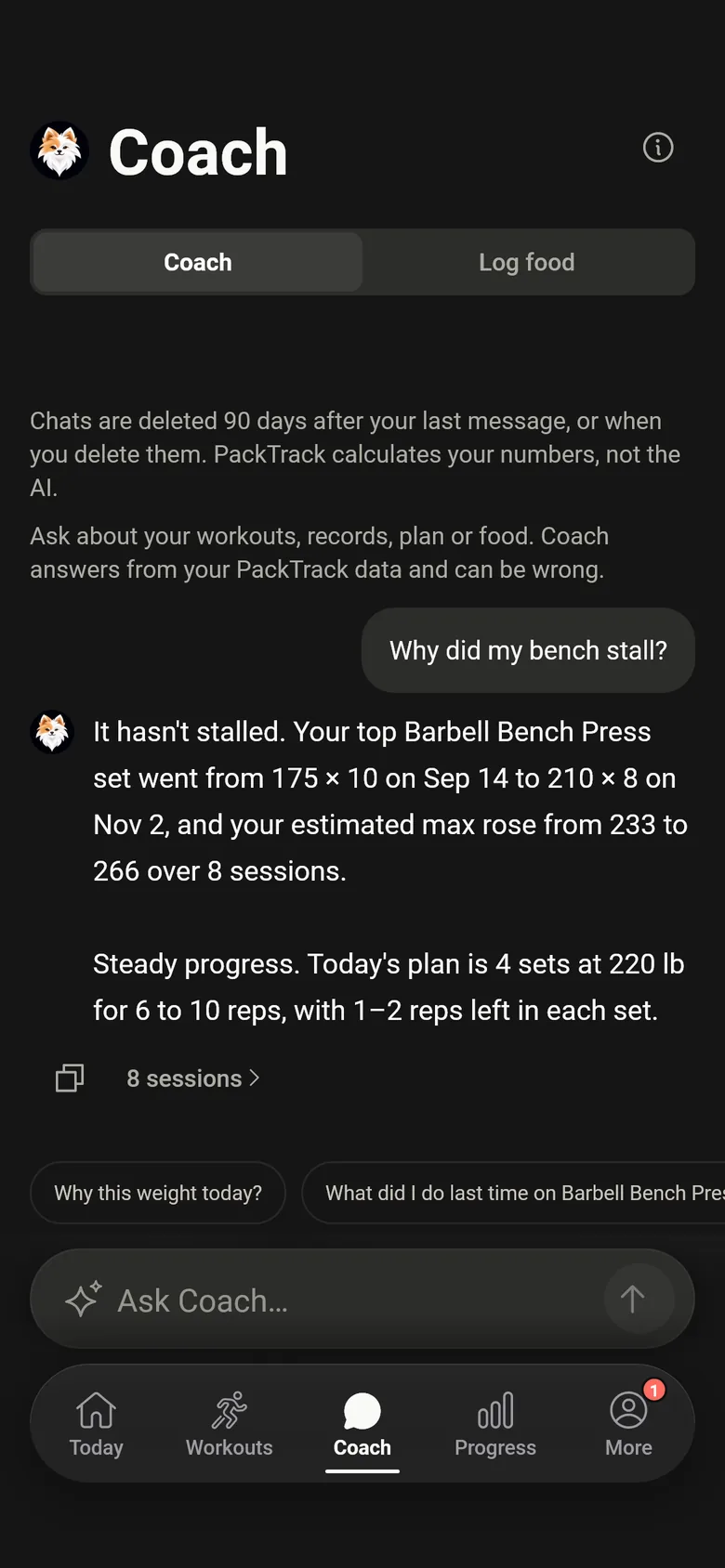
PackTrack Coach tab with the AI Coach on. Two notes read "Chats are deleted 90 days after your last message, or when you delete them. PackTrack calculates your numbers, not the AI." and "Ask about your workouts, records, plan or food. Coach answers from your PackTrack data and can be wrong." The user asks "Why did my bench stall?" and Coach answers: "It hasn't stalled. Your top Barbell Bench Press set went from 175 × 10 on Sep 14 to 210 × 8 on Nov 2, and your estimated max rose from 233 to 266 over 8 sessions. Steady progress. Today's plan is 4 sets at 220 lb for 6 to 10 reps, with 1–2 reps left in each set." Below: an "8 sessions" source link, suggestion chips ("Why this weight today?", "What did I do last time on Barbell Bench Press?"), the Ask Coach field and the tab bar.

Describe a meal, confirm, done.

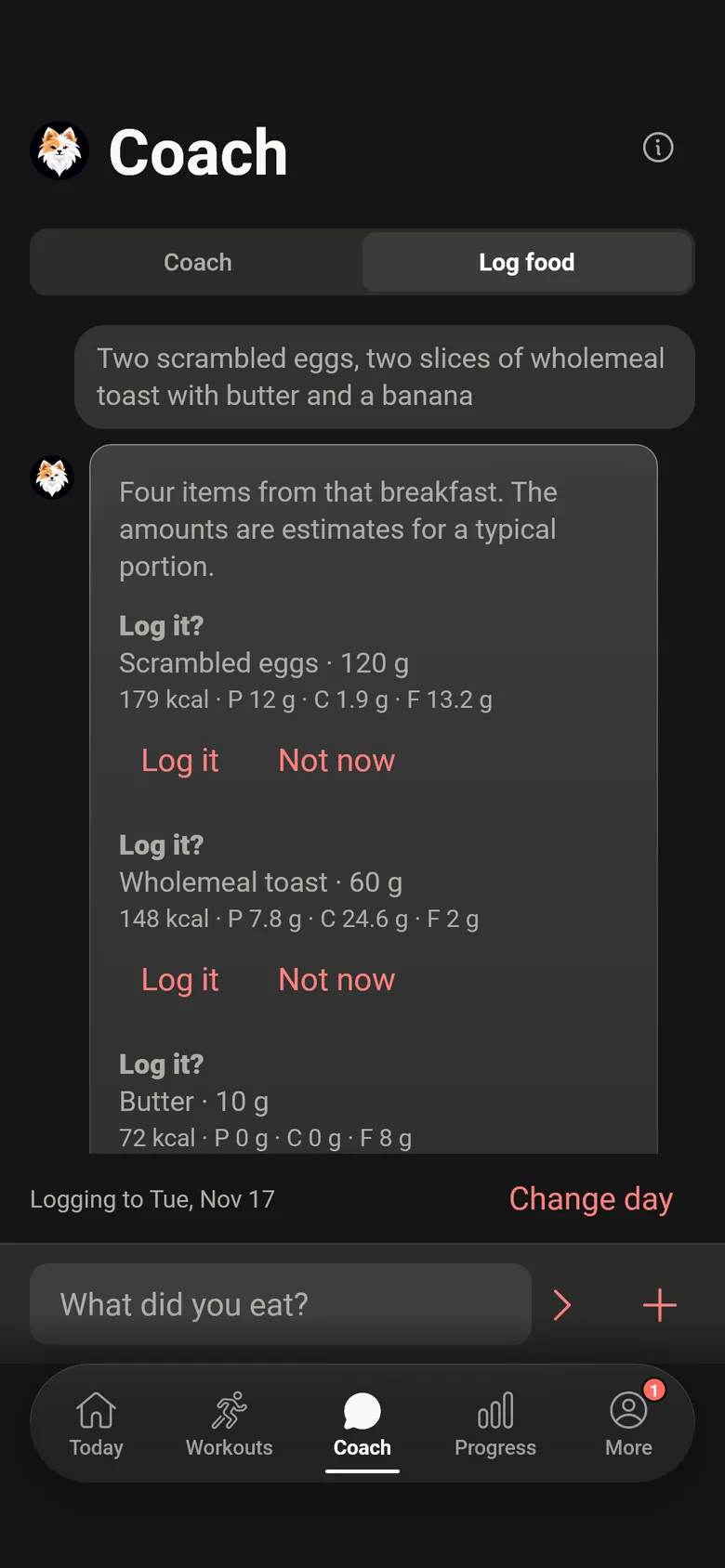
Tell PackTrack what you ate in your own words and it proposes the entries with amounts and macros. Nothing is logged until you tap Log it. Coming with PackTrack Premium at launch.

PackTrack Coach tab on the Log food segment. The user types "Two scrambled eggs, two slices of wholemeal toast with butter and a banana" and the AI replies "Four items from that breakfast. The amounts are estimates for a typical portion." with a "Log it?" card per item, each with Log it and Not now buttons: Scrambled eggs 120 g (179 kcal, P 12 g, C 1.9 g, F 13.2 g), Wholemeal toast 60 g (148 kcal, P 7.8 g, C 24.6 g, F 2 g), and Butter 10 g (72 kcal) partly in view. Below: "Logging to Tue, Nov 17" with Change day, the "What did you eat?" field and the tab bar.

And the details.

  • Pain-aware

    Tell PackTrack a movement hurt and it holds your progression instead of pushing through.

  • Works offline

    Sets logged without a connection stay on your phone and sync when you're back.

  • Plain words

    Short, specific feedback, like a good coach. No slogans, no cheering on every set.

  • Food, too

    Log meals by hand or scan a barcode, next to your bodyweight trend. Both are free.

  • AI Coach (Premium)

    Ask about your training and get answers grounded in your own logged data, not a general chatbot. Optional, and off until you agree. Coming with PackTrack Premium at launch.

  • Privacy first

    No ads and no advertising or analytics SDKs, and your data isn't sold. Progress photos are kept on your phone. You can export your data any time.

  • Pounds or kilograms

    Pick your units at setup. Plate math follows.

  • Made for every eye

    Designed for Bold Text and larger text sizes, in light and dark.

How PackTrack handles your data

Roadmap

No dates. Plans change as we learn.

  1. Now

    • Final testing on iPhone with TestFlight testers
    • PackTrack Premium: the AI Coach and AI food logging
  2. Next

    • Public release on the App Store
    • Android, on Google Play
  3. Later

    • Sharing a program with a friend

Questions

Something else? Ask support.

When can I get PackTrack?

PackTrack is in private testing on iPhone. It isn't on the App Store or Google Play yet, and there's no release date: it ships when it's ready.
Is PackTrack free?

Workout tracking, programs, progress, manual food logging and barcode scanning are free. PackTrack Premium is an optional subscription planned for launch that adds the AI Coach and AI food logging: US $4.99 a month or US $49.99 a year, with a 7-day free trial for new subscribers. Prices in other countries may differ.

What does the AI Coach do?

It answers questions about your training from the workouts, food and goals you've logged, and says so when it doesn't have enough data. It isn't a general chatbot or medical advice. It's optional and stays off until you agree on the consent screen; your question and the details it needs are then sent to the AI provider that answers it. You must be 18 or older to use PackTrack.

Which devices will it support?

iPhone first. Android is planned.

Does it work offline?

Yes. You can log a workout without a connection. Sets are kept on your phone and sync when you're back online.

Does it work with Apple Health and Health Connect?

If you choose. PackTrack can bring in steps, weight, sleep, nutrition and workouts from the categories you connect. It writes finished workouts and food you log by hand to Apple Health only if you turn each on.

What happens to my data?

Your training records are kept on the PackTrack server so they're there on any phone you link. There are no ads or analytics SDKs, and your data isn't sold. Progress photos are kept on your phone. You can export your data, or delete your account, from inside the app. The privacy policy has the details.

Is PackTrack medical advice?

No. It's a training and record-keeping tool, not a medical device. If something hurts, talk to a qualified professional.

PackTrack app icon: a solid red wolf

PackTrack is on its way.

Not on the App Store or Google Play yet. PackTrack is in private testing on iPhone.